

Diabetes Case Study - The Alert That Cried Wolf

Overview
TL;DR
CGM alert systems assume a patient whose only job is managing diabetes. Most users are people juggling parenting, driving, and work on top of it. Three real incidents show exactly where that assumption breaks — and six concrete directions for what a person-centered alert system would do differently.
Type 1 Diabetes arrived in my teenage years and has been present through everything since: architecture school, competitive basketball, two pregnancies, a full career building digital products. Not absent. Not in charge. Just there. What follows is grounded in lived experience across multiple devices and platforms, and published research where available. The goal is not to single out any manufacturer. Across the CGM and insulin delivery landscape, meaningful progress has been made, and that progress is real. But a systemic gap remains across the category.
Methodology and Findings
The Problem : Designed for a patient, not a person
The dominant paradigm of CGM alert design assumes a patient model: a person whose attention is largely available, whose context is relatively stable, and whose primary concern is glycemic control. For long-term, experienced T1D adults, this model creates a specific, well-documented failure: alarm fatigue.
A 2025 narrative review by Giza et al. identified alarm fatigue as the most common cause of CGM discontinuation, more common than cost, discomfort, or technical complexity. Alert design in healthcare has been shown to result in clinician override rates of 49–96% (Winters et al., 2018). The same dynamic plays out in consumer CGM use: experienced users routinely disable, silence, or ignore alerts. Not because they don't care about safety, because the alert system does not understand their context.
What happens when the system doesn't know your context
Not anomalies, representative of a class of design failures that repeat across devices, platforms, and years of use.
1. The Nursing Mother
The context
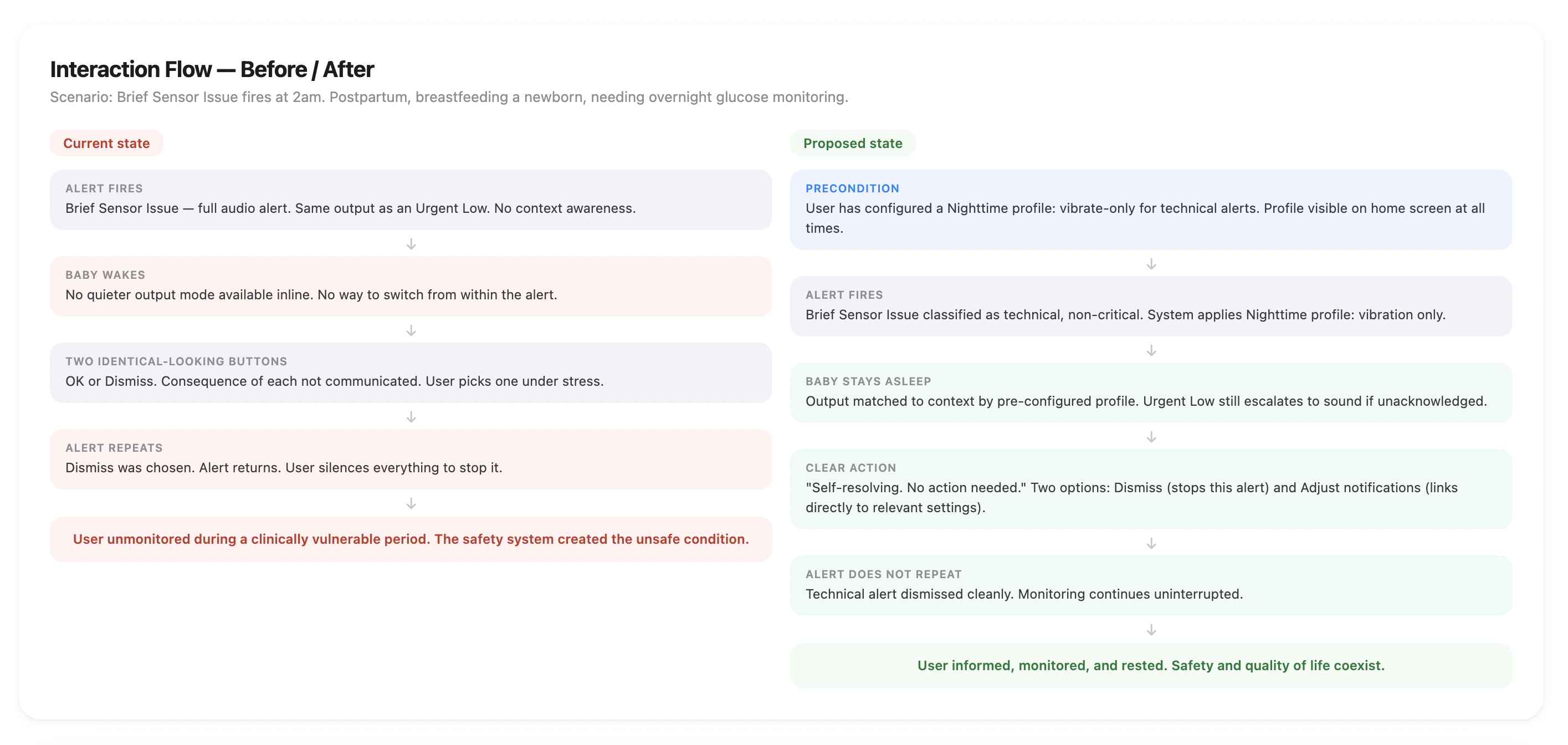
Postpartum, breastfeeding a newborn, nighttime, roughly 13 years ago. Overnight CGM use during this period is clinically prudent, not precautionary — glucose patterns are unpredictable and breastfeeding affects insulin needs in ways that are difficult to anticipate.
What happened
The CGM began alerting repeatedly for a sensor connection issue — a technical error, not a glucose event. The alert was audible and persistent. It woke the baby. Silencing it permanently wasn't an option; overnight monitoring was genuinely needed. No granular alert controls existed. Full alerts or silence everything. No middle ground.
How the category has evolved
Some systems have since made meaningful progress here. Per-alert configuration now exists on more advanced platforms, letting users separately manage glucose alerts and technical system alerts. Schedulable alert profiles mean a nighttime configuration can switch automatically without manual intervention — genuine improvements that address the core of what happened.
What the gap still is
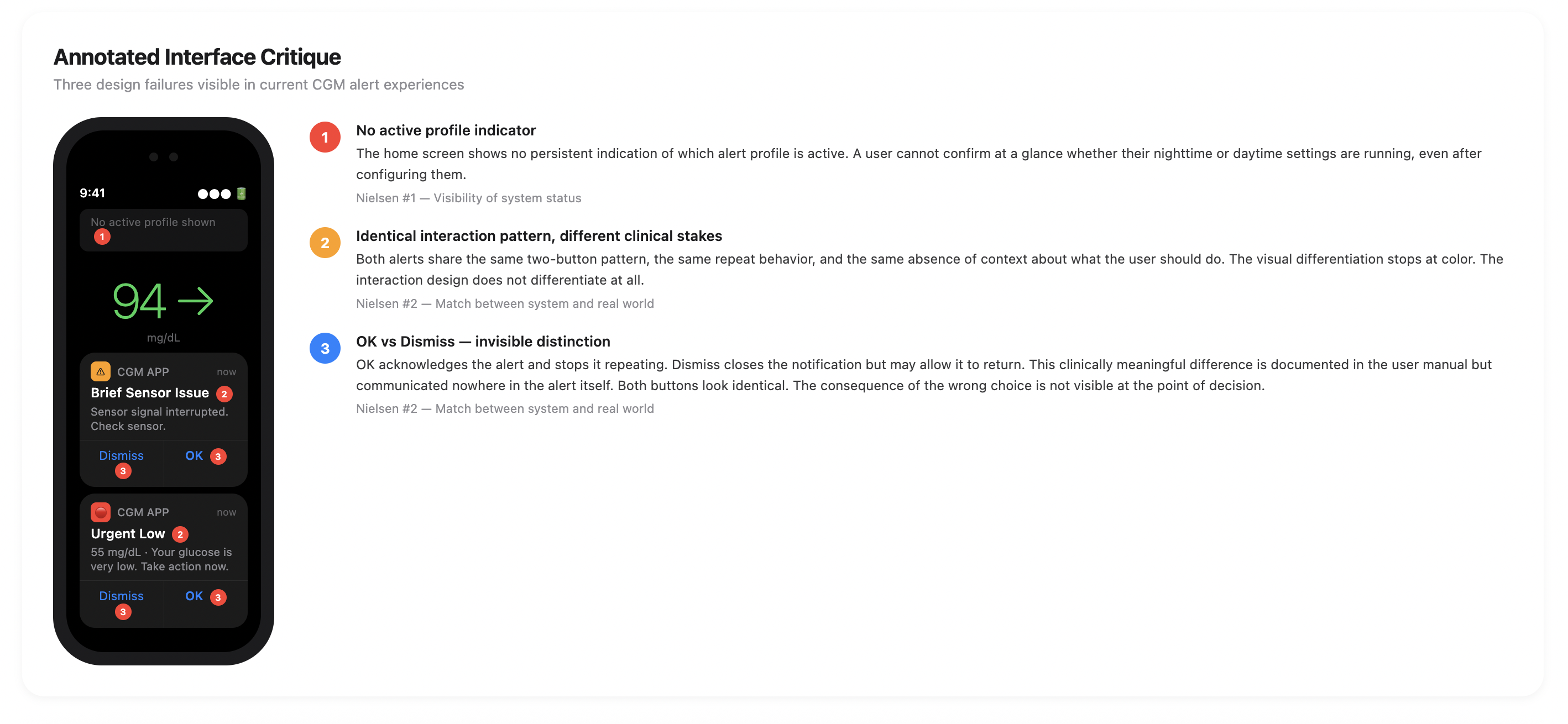
Even where these tools exist, the home screen of most CGM apps shows no persistent indicator of which alert profile is currently active. Switching profiles outside a schedule still requires navigating several levels into settings — not something easily done in the dark, half-asleep, with a baby in your arms.
Design principle — context-blind alert delivery. When mode-switching requires pre-configuration rather than contextual response, it forces users into workarounds that compromise the safety the system was designed to provide
2. The Highway
What happened
Driving to a work meeting, a persistent sensor connection error began alerting repeatedly — urgent and frequent enough to force an exit off the highway into a parking lot. There was nothing to resolve. The alert cadence gave no meaningful decision window: not enough time to assess, decide whether to replace an expensive sensor, or conclude it might self-correct. Late to the meeting, real road safety risk introduced. The sensor resolved on its own.
What the documentation confirms
On some CGM systems, a sensor connection error instructs users not to remove the sensor for up to 3 hours — while the alert continues firing throughout, with no resolution path offered. This is documented intended behavior, not a misuse scenario.
Design principle — actionless interruption. An alert that demands attention for a condition the user cannot resolve is not a safety feature; it's a liability transfer mechanism.
03. The Waterpark
What happened
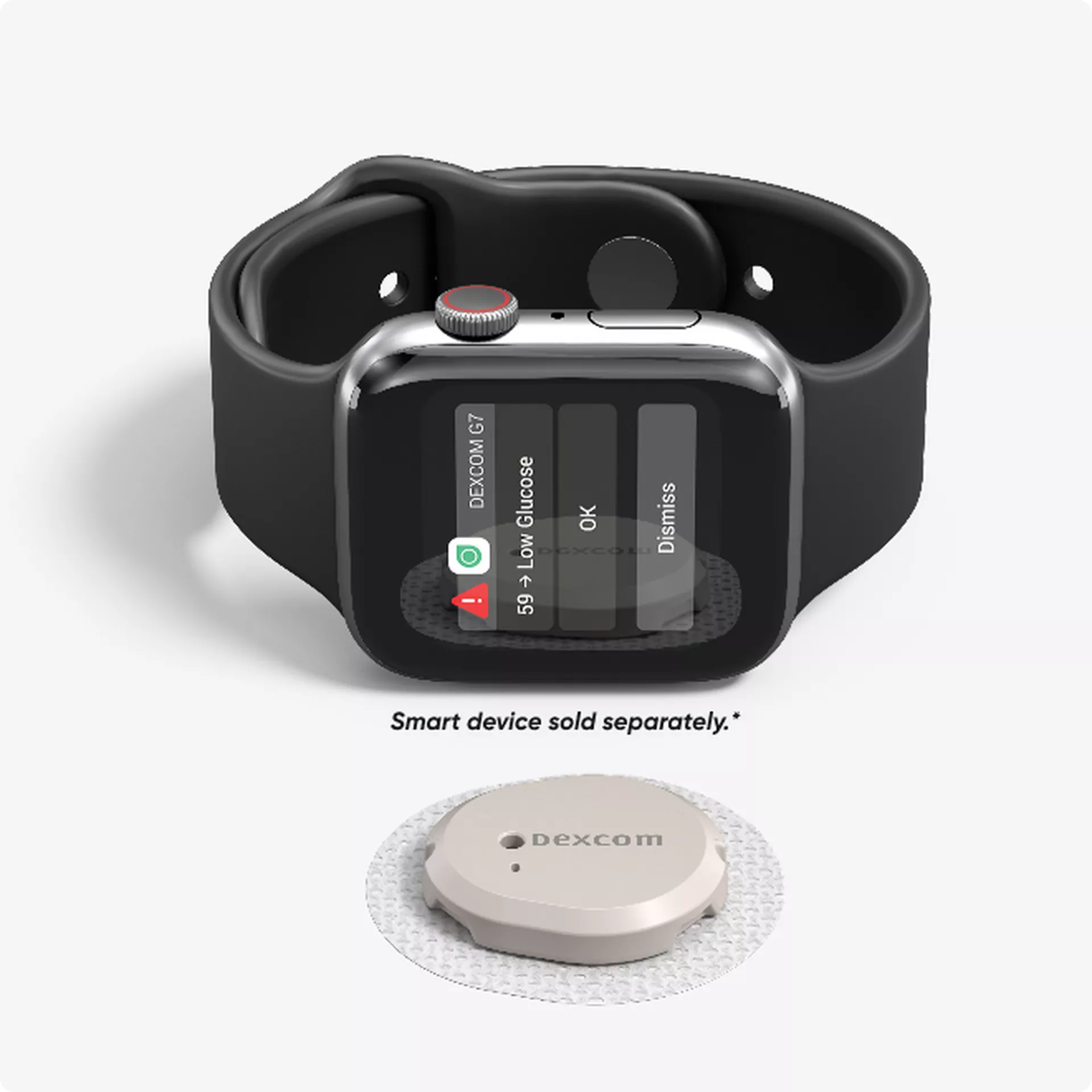
A day out with the kids, running a Dexcom G7 and an Omnipod simultaneously with a smartwatch as a tertiary display — a common dual-therapy configuration. A single sensor error triggered three independent alerts for one underlying event. The combined volume, in a crowded social environment while actively parenting, was overwhelming. All three got silenced — leaving the rest of the day without active monitoring, in a high-activity environment where glucose is inherently less predictable.
What the documentation confirms
Dexcom and Omnipod handle sensor errors as independent alert categories with separate troubleshooting paths. There's no cross-platform arbitration layer documented anywhere in either system's support materials.
Design principle — alert arbitration failure. The absence of cross-platform coordination creates a compounding alert burden that rational users resolve by disabling monitoring entirely.
The Bigger Pattern
A single structural failure
"These systems are designed for a patient. Most users are people."
A patient is someone whose primary context is their health condition. A person is someone for whom a chronic condition is one layer of a complex, full life — layered beneath parenting, work, caregiving, driving, and showing up for the people who depend on them.
The tools to manage alerts precisely have improved considerably. But good tools and accessible tools are not the same thing. When an alert fires at 2am, or while driving, or at a waterpark with your kids, the path to the right setting is several taps into a menu you did not memorize. The blunt instrument — silence everything — is always one tap away. That's not a failure of willpower. That's how humans work under stress.
Conclusion
What Good Could Look Like
Not product specifications. Design directions, framed as opportunities rather than criticisms of any specific manufacturer. Some are already partially addressed. None are fully realized.
1. Context-aware output modality
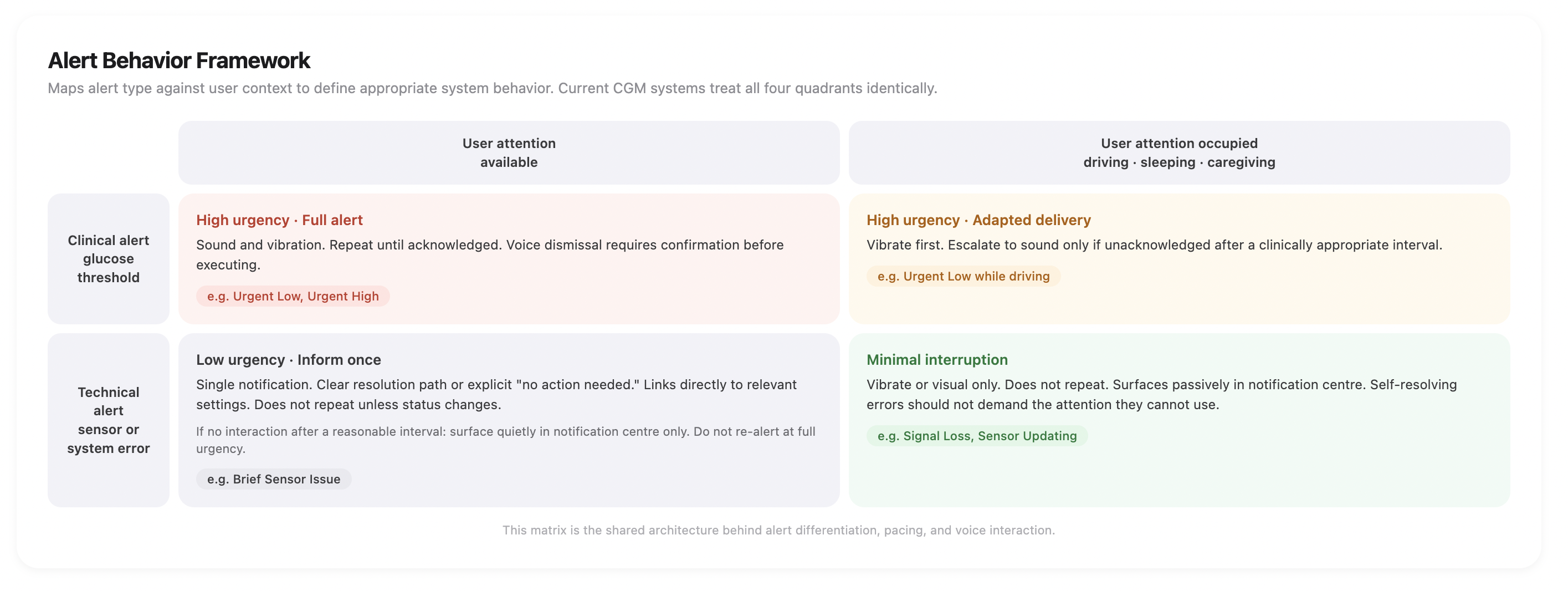
Alert systems should support multiple output modes and context-specific preferences that activate automatically. This mirrors established accessibility design patterns and requires no new hardware.
Critically, alerts should carry actions, not just acknowledgments: a second option that routes directly to resolving the issue, not just confirming interruption. The user in that moment is frazzled and interrupted. The design should meet them there.
2. Persistent mode visibility
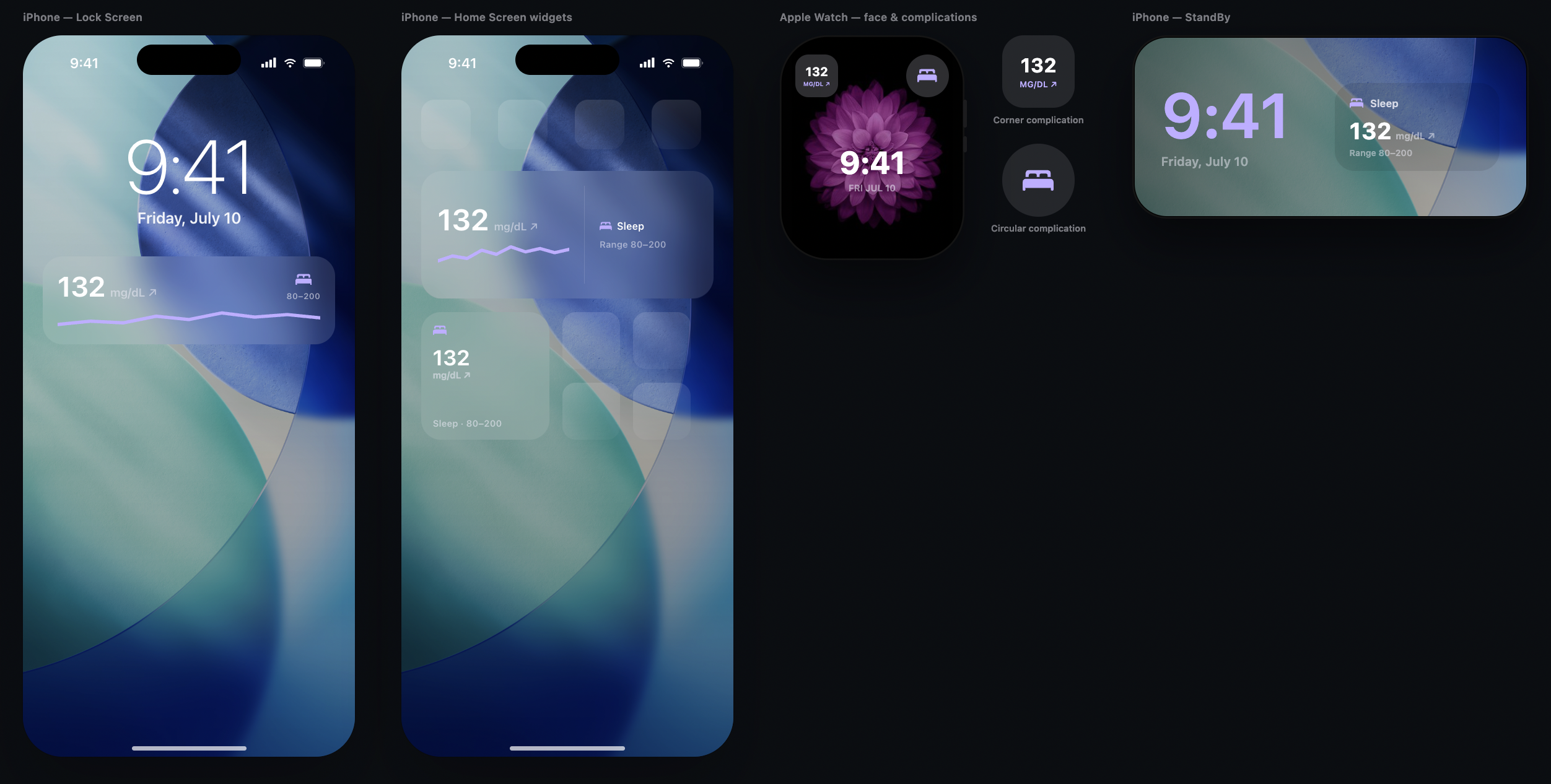
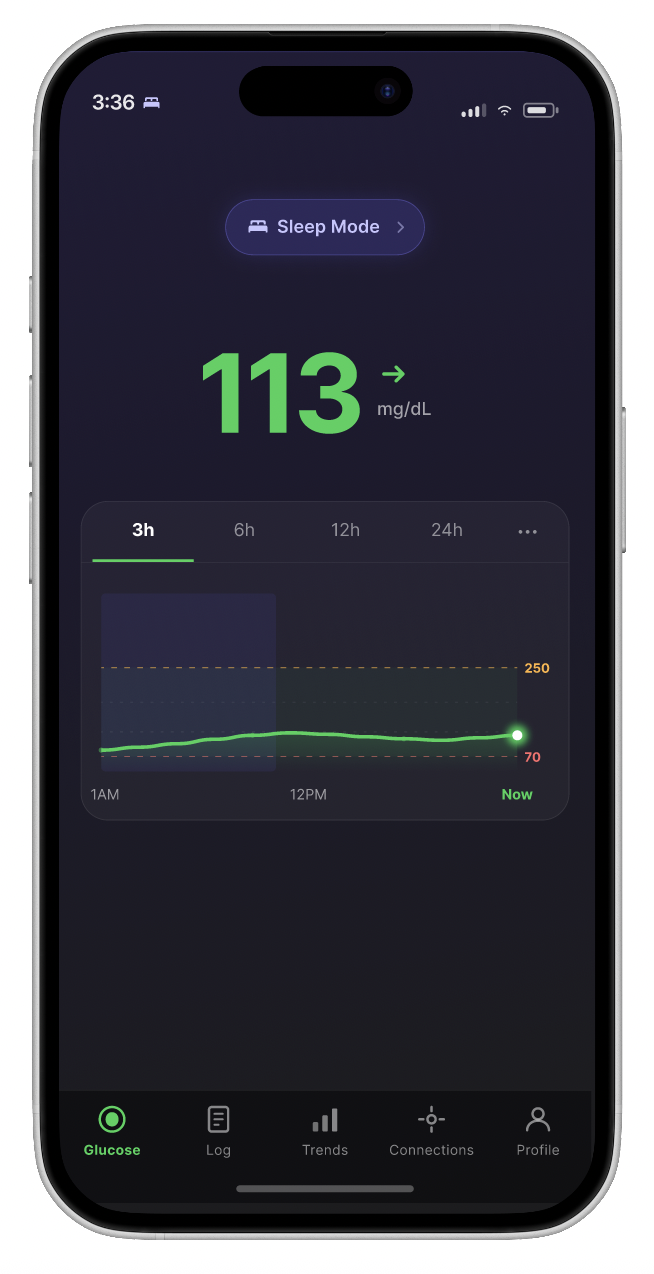
The active alert profile should be permanently visible on the main home screen, not only as a banner during active Quiet Mode. A user should confirm at a glance what their device will do before the next alert fires.
This gap isn't for lack of effort. The G7 app already lets users schedule a second alert profile, most often used at night, with the next scheduled switch shown inside Profile > Alerts. That's a real, working mitigation for the most common case: a fixed bedtime.
But a schedule is a guess about behavior, fixed at setup time. It assumes a stable sleep or exercise window. Anyone whose days shift, through travel, illness, or an unpredictable schedule, will eventually find their alert profile out of step with what they're actually doing. Nothing on the device signals the mismatch. The wrong thresholds run quietly, exactly when accuracy matters most.
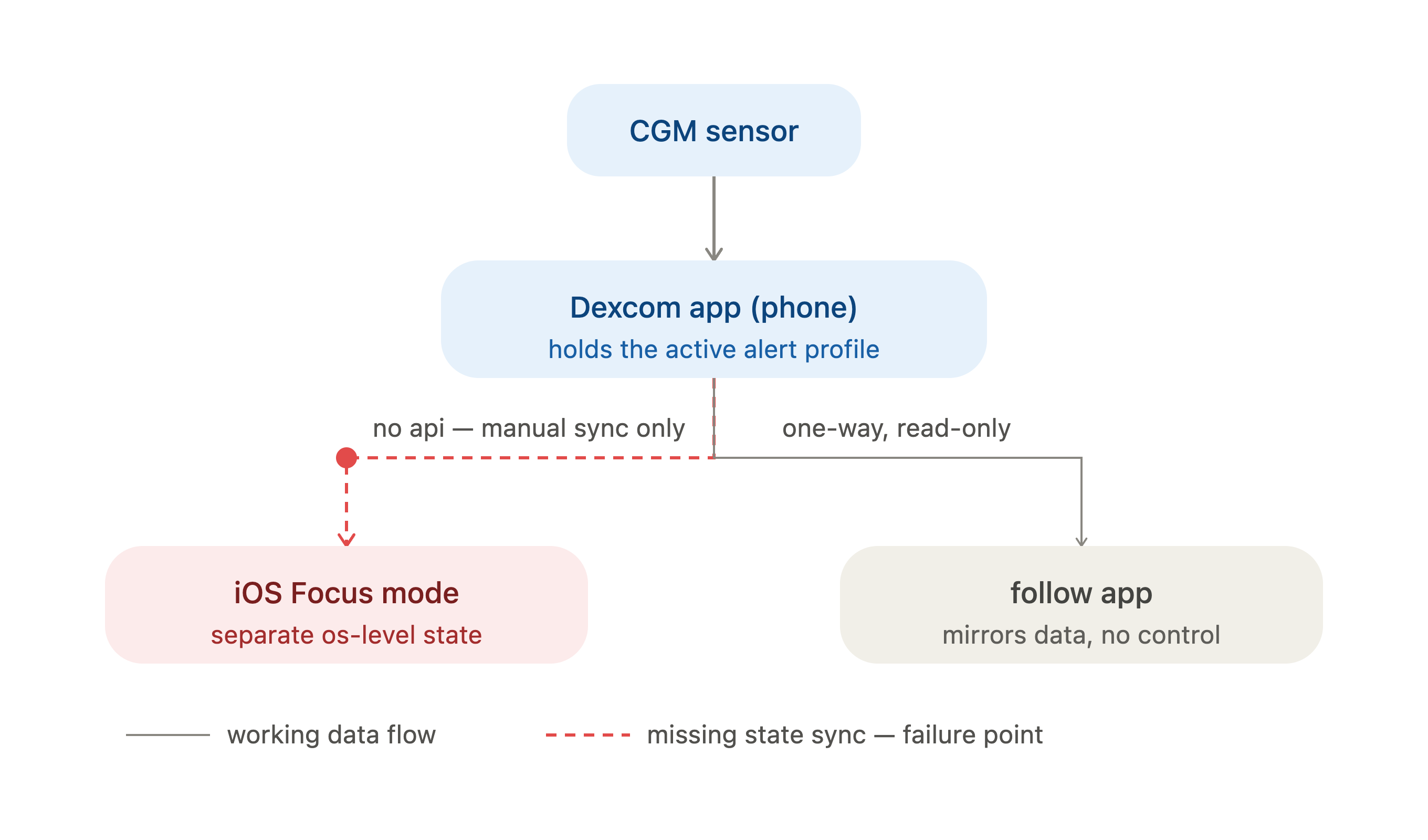
The natural next step is context-aware switching: a profile that follows what's actually happening, sleep beginning, a workout starting, rather than a fixed clock. iOS Focus modes already expose signals built for exactly this kind of automation, and many CGM users already lean on Focus modes informally to manage nighttime notifications. But there's no path from those signals into an app's own alert profile, and this isn't a gap unique to independent developers or any single manufacturer. Dexcom runs a public developer program with API access for authorized partners, and its documentation is explicit that real-time alerts and push notifications are excluded from that access. The one alert-related endpoint that exists returns a historical log of alerts already triggered, not a live read of which profile is active. Abbott's LibreView platform is documented the same way. Some Medtronic devices aren't open to third-party access at all. Dexcom is simply the most citable example, because its developer documentation is the most publicly detailed in the category, not because the underlying constraint is unique to it. The boundary holds even for companies with a signed data agreement, not only for a hobbyist automation.
A visible indicator synced to a Focus mode is a partial answer within that boundary. It can't read the app's actual setting, since nothing outside the app can. What it can do is make an assumed state visible enough that a mismatch has a chance of being noticed, rather than silently running the wrong thresholds through an entire night or workout.
A visible indicator synced to a Focus mode, shown here as one illustration of this direction, is a partial answer within that boundary. It cannot read the app's actual setting, since nothing outside the app can. What it can do is make an assumed state visible enough that a mismatch has a chance of being noticed, rather than silently running the wrong thresholds through an entire night or workout.
3. Alert type differentiation, pacing, and action clarity
Technical errors and clinical alerts should be architecturally distinct, delivered at different urgency levels. Where no user action is available, the alert should say so explicitly and reduce cadence accordingly. Alert actions need clearer communication too — when OK and Dismiss carry different consequences, that difference should be visible at the point of decision, not buried in documentation.
4. Cross-device alert arbitration
In integrated CGM and insulin management systems, alert deduplication should be a baseline expectation. Devices sharing a sensor data source should negotiate notification delivery and suppress redundant alerts across the ecosystem. Dismissing an alert on one device should carry over to the other.
5. Life-context modes
Beyond a simple on/off switch, CGM systems should support user-defined context modes (driving, sleeping, active, caregiving) that automatically adjust alert behavior within clinically safe parameters. The goal is not to reduce safety. It is to make safety compatible with the lives people actually live.
6. Voice interaction for alert management
Some platforms already support voice commands for passive data retrieval. Asking a voice assistant for a current glucose reading, for example. The technical foundation to extend this to alert management already exists. Apple's App Intents framework, available since iOS 16, would allow a developer to expose alert acknowledgment as a voice-triggered action. The barrier is not technical. It is a design decision that has not yet been made.
The concern that voice commands might accidentally silence safety-critical alerts is addressable. Aviation systems use a tiered confirmation model: high safety impact commands require explicit confirmation; low safety impact commands execute immediately. Applied to CGM alerts, dismissing an Urgent Low by voice would require a confirmation step; dismissing a self-resolving Brief Sensor Issue would not. A directed, multi-word phrase like "Hey Siri, dismiss alert" is also meaningfully different from ambient speech. Aviation design literature treats such trigger-phrase commands as a sufficient intentionality signal for non-critical actions.
Reflection
I spent years keeping my diabetes separate from my work as a designer. It felt important to maintain that boundary: to be a designer who happened to have T1D, not a T1D patient who designed things.
What I've come to understand is that separation was also costing me something. The pattern recognition built over nearly three decades, the ability to identify exactly where a system's assumptions break against reality, isn't incidental to my design practice. It's an extension of it.
The gap between what CGM systems assume and what T1D users actually experience is a design gap. It's researchable, addressable, and consequential. Closing it does not require new technology. It requires a more honest model of who the user is.
These observations come from one person's experience across specific devices and life stages. They are not a representative sample. What they offer instead is depth: the kind of longitudinal pattern recognition that accumulates over decades of daily self-management, and that is difficult to access through traditional research recruitment. That work is worth doing.
References
- Giza, S. et al. (2025). "Can Glucose Alarm Fatigue Threaten the Absolute Clinical Benefit of Continuous Glucose Monitoring in Optimal Glucose Management in Children and Adolescents with Type 1 Diabetes? A Narrative Review." Children, DOI: 10.3390/children12121668. Identifies alarm fatigue as the most common cause of CGM discontinuation. Note: study population is children and adolescents; findings are consistent with broader alarm fatigue literature across age groups. Available at: https://www.ncbi.nlm.nih.gov/pmc/articles/PMC12731774/
- Epstein, D.A. et al. (2020). "Mapping and taking stock of the personal informatics literature." Proceedings of the ACM on Interactive, Mobile, Wearable and Ubiquitous Technologies, 4(4), 1-38. Systematic mapping review identifying diabetes as the most studied chronic condition in personal informatics research. Available at: https://dl.acm.org/doi/pdf/10.1145/3432231
- Dexcom. (2025). "How to silence Dexcom G7 alerts with Quiet Modes." Dexcom All Access Learning Hub. Confirms that even in Vibrate mode, Urgent Low and technical alerts escalate to sound if not acknowledged. Available at: https://www.dexcom.com/en-us/all-access/dexcom-cgm-explained/making-the-most-of-quiet-modes
- Dexcom. (2024). "Are there any changes to alerts for Dexcom G7 compared to Dexcom G6?" Dexcom FAQ. Documents Quiet Mode behavior, alert profile scheduling, and escalation exceptions. Available at: https://www.dexcom.com/en-us/faqs/are-there-any-changes-to-alerts-for-dexcom-g7-compared-to-dexcom-g6
- Dexcom. (2023). "Here's How New Delay 1st Alert and Quiet Mode Features Improve the Dexcom G7 User Experience." Confirms Dexcom's own acknowledgment that excessive notifications diminish alert significance and contribute to fatigue. Available at: https://ca.provider.dexcom.com/articles/heres-how-new-delay-1st-alert-and-quiet-mode-features-improve-dexcom-g7-user-experience
- Medtronic. "What do I do when I get a Sensor Updating alert?" Medtronic Diabetes Support. Documents the instruction not to remove the sensor for up to 3 hours during a Sensor Updating alert, with no available user resolution path. Available at: https://www.medtronic-diabetes.com/en-gb/help-centre/faqs/what-do-i-do-when-i-get-sensor-updating-alert
- Dexcom. "How do I turn off G7 CGM alerts that I don't need?" Dexcom FAQ. Confirms that Urgent Low and technical alerts cannot be fully silenced and will escalate regardless of user settings. Available at: https://www.dexcom.com/en-us/faqs/how-do-i-turn-off-alerts-that-i-dont-need
- Dexcom. (2023). Dexcom G7 User Manual. Documents the distinction between OK (acknowledges alert, stops repeat) and Dismiss (closes notification, may allow repeat), a clinically meaningful difference not communicated within the alert itself. Available at: https://www.manualslib.com/manual/2987150/Dexcom-G7.html
- U.S. Patent 9,824,689 (2017). "Speech recognition for avionic systems." Documents the tiered confirmation design pattern for safety-critical voice commands: high-impact commands require explicit confirmation before execution; non-safety-critical commands execute immediately. Provides documented precedent for applying voice command tiering to alert management in safety-sensitive contexts. Available at: https://image-ppubs.uspto.gov/dirsearch-public/print/downloadPdf/9824689
- Winters, B.D. et al. (2018). "Technological Distractions (Part 2): A Summary of Approaches to Manage Clinical Alarms With Intent to Reduce Alarm Fatigue." Critical Care Medicine, 46(1):130-137. DOI: 10.1097/CCM.0000000000002803. Documents clinician alarm override rates of 49–96% as evidence of systemic alert fatigue in healthcare settings. Available at: https://pubmed.ncbi.nlm.nih.gov/29200048/
- Dexcom. "Dexcom API Documentation." Describes the Dexcom Developer Program and the process for becoming an authorized Digital Health Partner with API access. Available at: https://developer.dexcom.com/docs/
- Momentum. (2026). "Dexcom API Integration: A Developer's Guide." Documents that alerts and real-time push are not available through the standard partner API, and that the API is designed for retrospective data retrieval, not live alerts or real-time dashboards. Available at: https://www.themomentum.ai/blog/dexcom-api-integration-developer-guide
- Dexcom. "Alerts Endpoint (API v3)." API reference documentation. Confirms the /alerts endpoint returns historical alert records within a specified date range, not a live read of the currently active alert profile. Available at: https://developer.dexcom.com/docs/dexcomv3/operation/getAlertsEventsV3/
- Abbott. "LibreView Patient/Individual User Terms of Use." Describes LibreView as intended for the review, analysis, and evaluation of historical glucose and related data, the same retrospective framing documented for Dexcom's API. Available at: https://api.libreview.io/document/toupat?lang=en
- "Unlocking Real-Time Data Access in Diabetes Management: Toward an Interoperability Model." PMC. Documents that newer Medtronic devices, including the MiniMed 780G, are unavailable for open-source or third-party software integration. Available at: https://pmc.ncbi.nlm.nih.gov/articles/PMC11954377/